Sector(s)
Project Team
Team members:
- Antoine Osanz - Engagement Manager
- Govind Malu - Senior Backend Developer
- Ivan Grynenko - Technical Lead
- Nathan Perry - Senior Developer
- Julie Erben - Engagement Manager
- Alan Cole - Senior Frontend Developer
- Suchi Garg - Technical Lead
- Eric Fitzgerald
- Solange Kershaw - Senior Frontend Developer
- Nathan Rzepecki - Senior Developer
- Tarnnum Bansal - QA Tester
Visit the site
Visit the siteOrganizations Involved
Community contributions
The migration project was part of a larger project, OpenCMS. OpenCMS involved development of several key modules that were included in the OpenCMS distribution (this distribution did not make a public appearance). Custom modules provided functionality for:
-
Reporting security updates to a single management console
-
Integrated deployment and version management from a single management console
-
An OpenCMS theme, component-based and built out of multiple modules that could be enabled/disabled to achieve the required frontend functionality.
Salsa Digital brought together 25+ legacy sites (running across three different content management systems (CMSs) — Joomla, Drupal and WordPress — with different and out-of-date versions) into one common architecture platform. This project meant all sites were running on up-to-date CMSs with the latest patch versions applied, providing a clean foundation to maintain patches moving forward. Due to a strict communication policy, this client cannot be named.
About the project
The challenge
Over the years, the number of websites had grown organically. In fact, the university had over 25 websites on three different content management systems (CMSs), on different versions, on different infrastructures, and with different vendors. The sites had been built in Joomla, Drupal and WordPress, but different versions of these CMSs were running across the sites (e.g. there were sites on Drupal 6.x, Drupal 7.x and Drupal 8, and it was a similar story for Joomla and WordPress). This meant the sites were inconsistent, difficult to maintain, and it was becoming increasingly difficult to onboard new sites.
In addition, these different and out-of-date CMSs also meant that security patches weren’t up to date, and site security was a serious risk.
As an additional incentive to take action, most of the sites were hosted on servers in the university’s data centre, and they needed to free up this space and convert it into lecture theatres.
The solution
This was a large project that required thorough planning and careful execution to deliver the new system.
Planning
The first part of our planning process was discovery, working with key stakeholders to make sure we understood the problems and the requirements. From here, we created an inventory of the existing sites and business owners. We needed to capture detailed information about each site, including the CMS used (name and version), the patch levels, level of customisation, number of templates, responsiveness, etc.
This inventory gave us a clear picture of site complexity so we could design a migration strategy for each site. While we discovered some sites could be decommissioned, most sites required one of three migration strategies:
1. Upgrade as-is: Migrate the site to the latest stable version of the CMS with functionality remaining as-is.
2. Rebuild: Rebuild the site from scratch (in some cases this was more time-effective and cost-effective than trying to upgrade the site, particularly those sites that were significantly more complex and/or end-of-life).
3. Content lift: Bring only the content across onto a new and standardised university-branded base template distribution.
The planning process also included working out what the new onboarding procedure would look like and planning the actual build, including the baseline functionality for the new system. To help with visualisation, we created a ‘blueprint’ to demonstrate the different layers in our service design. This blueprint is applied to all three CMSs (i.e. there are effectively three blueprints, one for Drupal, one for Joomla and one for WordPress). You can view the blueprint at the bottom of this page.
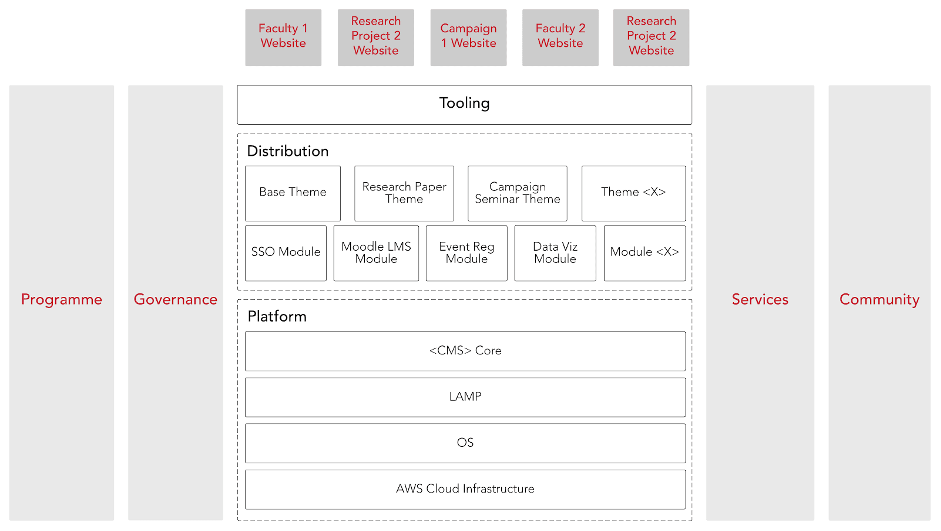
The build
Now it was time to build. This phase can be broken into five key elements:
-
Build target infrastructure platform: AWS Lightsail was the infrastructure service of choice.
-
Build base distribution per CMS: Build a custom distribution for each CMS. SSalsa Digital began with the Drupal 8 distribution using Acquia Lightning and leveraged DTA’s UIKit 2.0 where possible. We then moved on to WordPress and Joomla.
-
Build base templates
-
Build all the tooling (such as automation, provision scripts, patching scripts, release scripts and risk-tracking scripts (e.g. tracking for bad code or security problems))
-
Migrate sites, following the relevant strategy for each site.
Agile methodologies were used throughout the build to ensure the best delivery possible. It was also important that the university and its sites could continue business-as-usual, so the project took place in the background, ensuring no down-time for sites.
The outcomes
-
Improved security — the university’s biggest concern has been resolved with sites being consistently patched and maintained
-
Improved and centralised maintenance
-
A better user experience via new design templates
-
A new, easier onboarding system for new sites within the university
-
Reduced costs through centralisation and efficiencies across the internal university websites
Why Drupal was chosen
Salsa Digital and our university client chose Drupal as the first option for a standardised theme and distribution, to be used for any new sites.

Technical Specifications
Drupal version:
Key modules/theme/distribution used:
To satisfy functional requirements of the website, provide single administration interface, media management and rich display options