Visit the site
Visit the siteOrganizations Involved
Community contributions
When I decided to integrate with Apple Wallet, I discovered there were no contributed modules that allow this functionality. As such, I built out a custom module which I then put up on Drupal.org to integrate the pkpass/pkpass library with Drupal. This module enables developers to build their own wallet package from a data array that is served to the user as a download.
As the baby boomer generation ages, many are considering their end of life wishes and directives. Part of this process can include considering and laying out Do Not Resuscitate instructions. However, if these instructions are not known to first responders, a person's DNR wishes will likely not be known, to be respected.
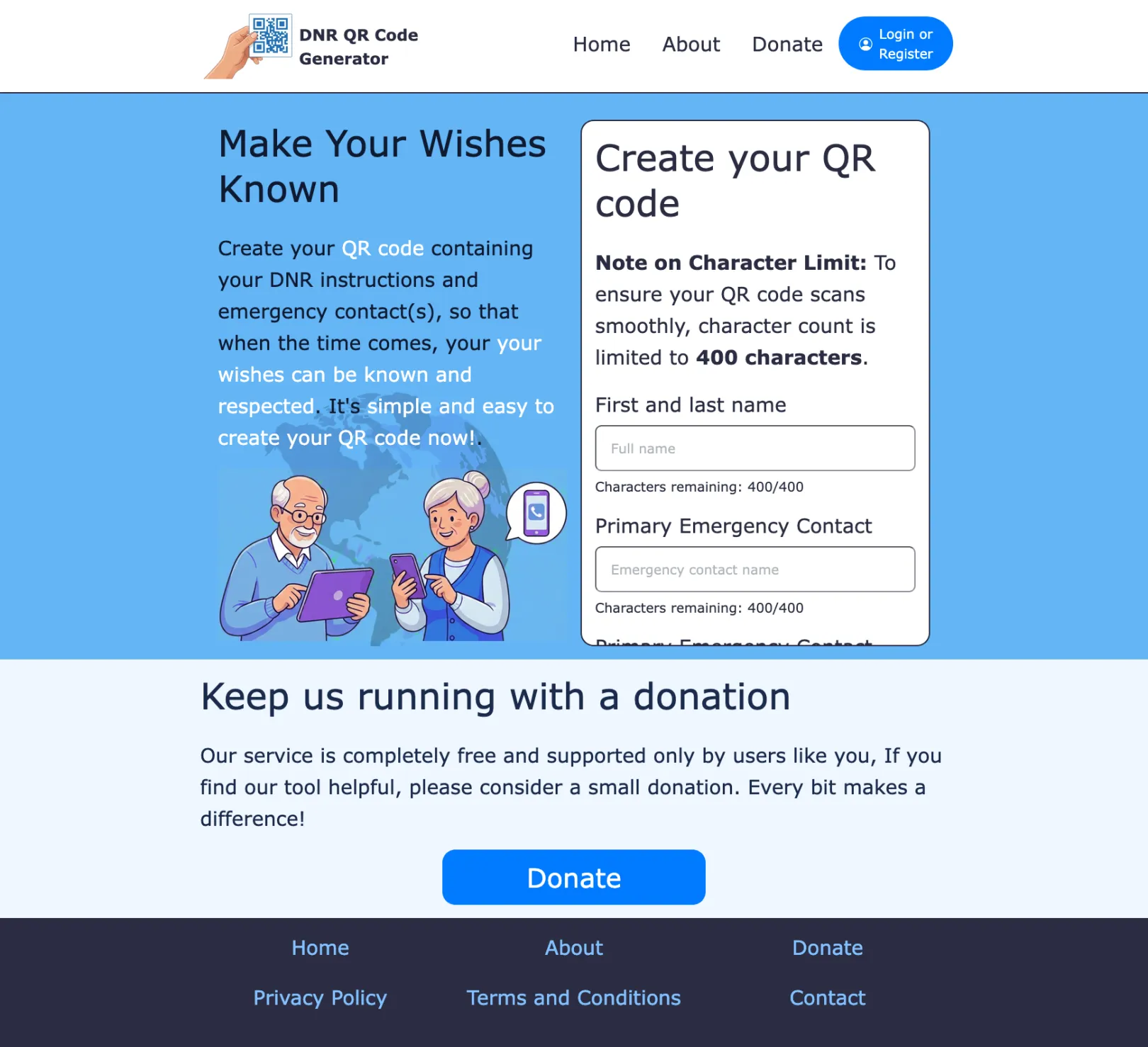
qr-dnr.com is a free, donation-supported web service that creates QR codes containing a person’s Do Not Resuscitate (DNR) instructions and emergency-contact information. Its central proposition is simple: place a scannable version of important medical wishes on a wallet card, medical-alert accessory, phone case, or another personal item so that someone encountering the person in an emergency can access the information quickly.
The site is an information-formatting and emergency-access tool, rather than a medical-record system or a legal DNR Registration service, though it's hoped that these can come in the future. The site terms state that it does not replace formal medical orders or legally recognized directives, and that it cannot guarantee that emergency responders will scan, recognize, or follow the information.
About the project
This project came about when talking to my parents about end of life. I realized that a QR code could be used to encode the relevant info that could help emergency responders, who likely will all be carrying a device, have access to a patient's DNR instructions.
I had a week on my hands. I pledged to build the site out and have it live within one week, as a personal challenge. I woke up on Monday, and began programming hard. And I put my MVP live that Sunday night, meeting my goal.
Project Goals
There were a number of goals for the project. The primary function of the site is to let users generate a QR code they can download, containing their DNR instructions and emergency contact info, formatted to be read offline by emergency responders. The entire site is built around this idea. Users are allowed to use the tool without creating an account, and without a cost. So the site is to be funded through donation, which required e-commerce integration. As the site is not expected to generate much income, overhead must be kept low. A server I already pay for was used to host the site, and I used a free ssl.com SSL certificate for https, leaving only the domain costs for the year. Later, I discovered Apple Wallet integration requires an Apple Developer's Account, which comes with a yearly fee.
Technology Stack
I determined to use the following stack to build the system:
- Core System: Drupal 11
- Front End Framework: Bootstrap 5
- E-Commerce: Drupal Commerce to enable donations
- QR Generation: Self Hosted QR Code Generator module
- Apple Wallet Integration: pkpass/pkpass library for generation of Apple Wallet downloads (as part of this project, I created the PK Pass Integration API module to integrate Drupal with pkpass/pkpass)
- Payload Standard: vCard Formatting for the offline QR codes, allowing them to be read by devices when no internet connection is available
Privacy & Data Lifecycle
For privacy purposes, the QR codes generated by anonymous users are deleted from the file system after a short period of time. As well, the URLs to access the codes are set behind obfuscated URLs to keep it safe from prying eyes.
After users have created a code, they are able to create an account so that they can re-download their QR code again in the future. When the account is created, the temporary QR code that was generated for the anonymous user is moved to the private file system, and attached to the new account, so that it can only be accessed by the account holder (and admins). This account must be created before the temporary QR code has expired and been purged from the system.
QR Code Limitations
Before building the site, I knew that QR codes could allow roughly 4096 characters. However, upon research, I discovered that while this limit is technically true, in a practical application I was limited to about 500 characters, including formatting. As the amount of data embedded in a QR code increases, the pixel density of the QR code also increases. And the more dense the pixels, the harder it is for devices to read the code. I have a future idea to integrate the site with a company that prints the QR code onto a credit-card to be put in one's wallet, which gave me an idea on a minimum size the QR code would be. I then worked backwards with an AI, cross referencing standard device capabilities in 2026, to determine the 500 character limit. This meant setting up the UI to limit the user to 400 characters, with a live character count.
Offline QR Codes
Another limitation I ran into was that while devices can read QR codes, they only do something if the data is formatted in a way they know how to open - for example they can open URLs in a browser, or a map location in a maps app. I wanted the data in the QR code to be able to be read offline, meaning I needed to determine a method of formatting the data so that phones could open it. There were not many options. In the end, I settled on formatting the data as a vCard. This opens the data in a contact card, that shows the QR code owner's name, their primary contact phone number, and the DNR instructions as the notes for the contact. These will pop up on the device that reads the QR codes, but does not save the data to the user's phone (unless they click save). It gives a quick reference of how to care for the patient, and who to contact for the emergency.
Online QR Codes
Ideally however, first responders will have internet access. Therefore, when a user creates an account, they are able to enable an online URL that contains their full data for viewing by first responders. This URL contains their private information, and therefore is behind a tokenized URL path to hide from prying eyes. Upon enabling this functionality, the PDF download for their code is updated to fit two sides of a business card, the offline instructions as described above, and a link to the online page, allowing for more information in a cleaner format than the contact popup used for offline viewing.
Digital Wallet & Quick Access
The next limitation I ran into was that users can easily download a QR code, but it's buried in their photos or files on their phone - not necessarily easy to produce in an emergency. While printable cards are one future solution I hope to implement, I wanted to integrate with existing device capabilities in their "natural" way, providing easy access. With some research, I decided that Apple Wallet and Google Wallet would best provide this functionality. Users are able to set up hotkeys from their lock screens that can open the digital wallet, allowing them to produce their QR code quickly in an emergency, or for first responders to be able to open it when a patient is unable to. I am an iOS user, so I have set up Apple Wallet integration for users with their public URL enabled. Apple Wallet integration requires an Apple Developer account, to create the certificates used to digitally "sign" the wallet item, so that the device adds it to the wallet when downloaded.
Apple Wallet items are downloaded as a .pkpass file, which is a special type of zip file, containing the data to be added to the wallet. I did a search of the contributed modules on Drupal.org, but did not find any that handled the building of these packages, so this required custom code, which I then made available on Drupal.org for the community, as the PK Pass Integration API module. This module allows Drupal developers to build a wallet item, integrate it with their Apple certificates, and create the packages downloaded as a wallet item to the user's device.
Front End Custom Theme
The front end of the site needed to be usable for senior citizens, who may not be technically adept. As such, a custom front-end theme was created, with large, bold texts, wide spacing, and high contrasts. The theme is entirely custom, using Bootstrap 5 as a framework, and SASS for the CSS generation. The site is mobile friendly and viewable across a wide range of devices.
Usage of and Integration with AI
The site itself has no AI integration, and at the moment there is not any intention to integrate any AI into it. However, building of the site was heavily supported by AI. I used AI as an assistant, to dump out blocks of code I would use as a starting point, rather than having to do all of the tedious coding of the past. For example, when creating custom data types, I used AI to create the "getter" and "setter" functions. Usually, writing out these functions is a time-consuming task, with little thought required. I also used AI to prototype various designs as I proceeded, which I used as a basis, coding the HTML myself, and adapting to ensure continuity between pages, in ways AI is not able to achieve. All in all, I think the usage of AI as an assistant cut down on my development time for the site by at least 50%, maybe more.
Achievements
- Shipped a working MVP in 7 calendar days.
- Maintained launch costs under CAD$200 (domain registration and Apple Developer license).
- Contributed an open-source Drupal module (PK Pass Integration API) back to the community.
- Built zero-licensing infrastructure managed cleanly via Composer and Git for low long-term maintenance.
Why Drupal was chosen
I chose Drupal because I am a triple-certified Drupal expert, and Drupal is my tool of choice. This project required QR code generation, e-commerce capabilities, memberships, private and secure file storage, a robust permissions system, and integration with Apple Wallet, all things that Drupal core, some well-chosen modules, and a little custom code to bind it all together can achieve quickly and efficiently. As well, Drupal being a Composer managed system makes the code deployment and maintenance an efficient to manage system.
Technical Specifications
Drupal version:
Key modules/theme/distribution used:
The modules chosen provided the core functionality of the site:
Commerce: Allows for users to make donations to the site
Commerce Stripe: Enables Stripe as the payment gateway, to take the payments
Self-Hosted QR Code Generator: Allows for the creation of QR codes from a data array
PK Pass Integration API: Enables the creation and download of .pkpass packages that are the files that are added to Apple Wallets