Sector(s)
Ranking among the largest university library systems in the United States, this system has 20-plus libraries and information centers. The University Library System partnered with Mediacurrent to help plan and move to a robust Drupal 8 platform with a user-centered design. UX features, such as a bento box search, and provide a forward-thinking approach to information access, sorting, and content delivery.
Results
With the upgrade to Drupal 8, the Univesity Library System saw a 30% uptick in users from the added library content, plus increased traffic to the site:
75%increased page views
18%increased mobile traffic
About the project
The Challenge
The University Library’s primary goal was to improve the ability to conduct research, transforming the site into a dynamic research tool combining millions of library resources. They took a strategic leap to improve library services by partnering with Mediacurrent to design and build a new Drupal 8 platform, aiming to address these challenges:
- Varying User Goals and Needs: The library websites serve a wide variety of users, from new students to seasoned faculty with years of experience.
- Personalization: Existing data for authenticated users wasn’t harnessed to deliver a personalized experience for these varying user groups.
- Search: Users demanded a way to customize their experience by saving configurations, tools, and content relevant to their research.
- User Experience: A visual UI overhaul and fresh, user-centered design was needed to streamline a cluttered search interface while incorporating additional data sources.
- Accessibility: Designing for accessibility and section 508 and WCAG compliance was a critical building block.
Mediacurrent’s Solution
Using this redesign project as a clean slate, our approach was to maximize and gain optimal performance from the University Library’s content and make it easy for all end-users and editors to support and extend.
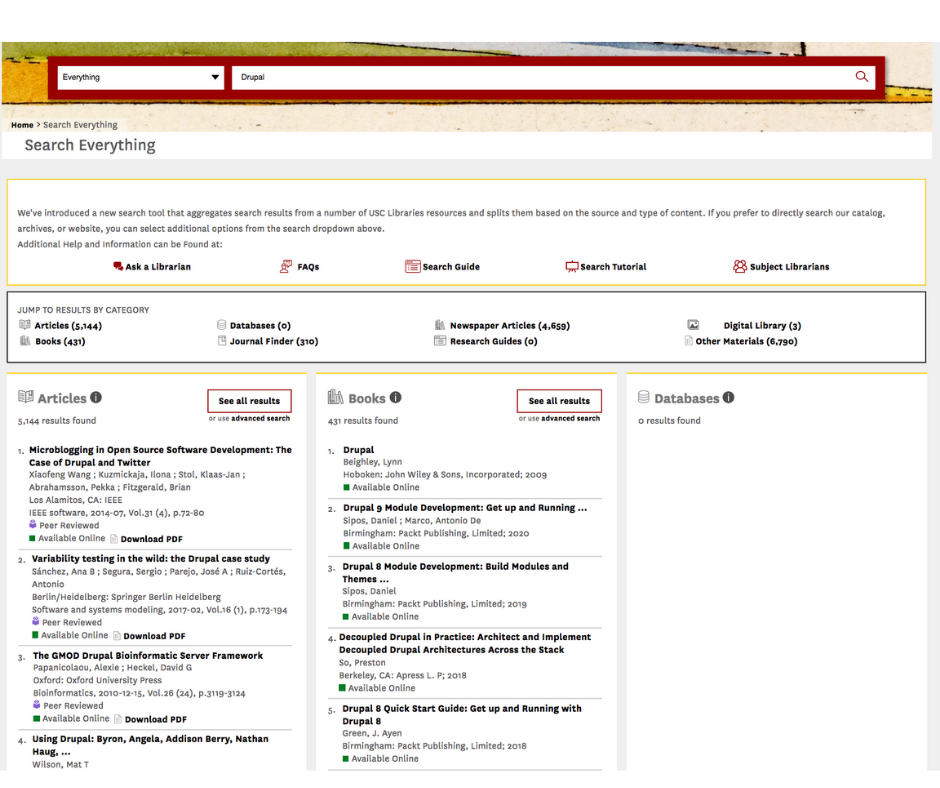
To achieve this, we created a Drupal platform that integrates the library’s third-party research tools and student information system. On the new site, tailored UX, bento-style site search, and expanded dashboards guide students to university resources. A clean and focused search interface integrates 20+ libraries with a myriad of user personas and 3rd-party content sources.
Transforming the User Experience
In the project discovery phase, Mediacurrent’s digital strategic analysis focused on defining and prioritizing the most impactful site features and content. User research uncovered several pain points with the existing site search. Overwhelmingly, users’ felt frustrated with the various search and log-in systems. They needed a better way to customize their experience by saving configurations, tools, and content relevant to their research.
Building a Multi-Faceted Search
Our design challenge was to present tens of thousands of search results from multiple repositories with a wide variety of attributes in a way that is not overwhelming to the user. By combining user survey data and stakeholder interviews with research-proven UI patterns, we designed a filterable “One Search” feature that improves search efficiency and brings order to a previously fragmented experience.
Quick Browsing
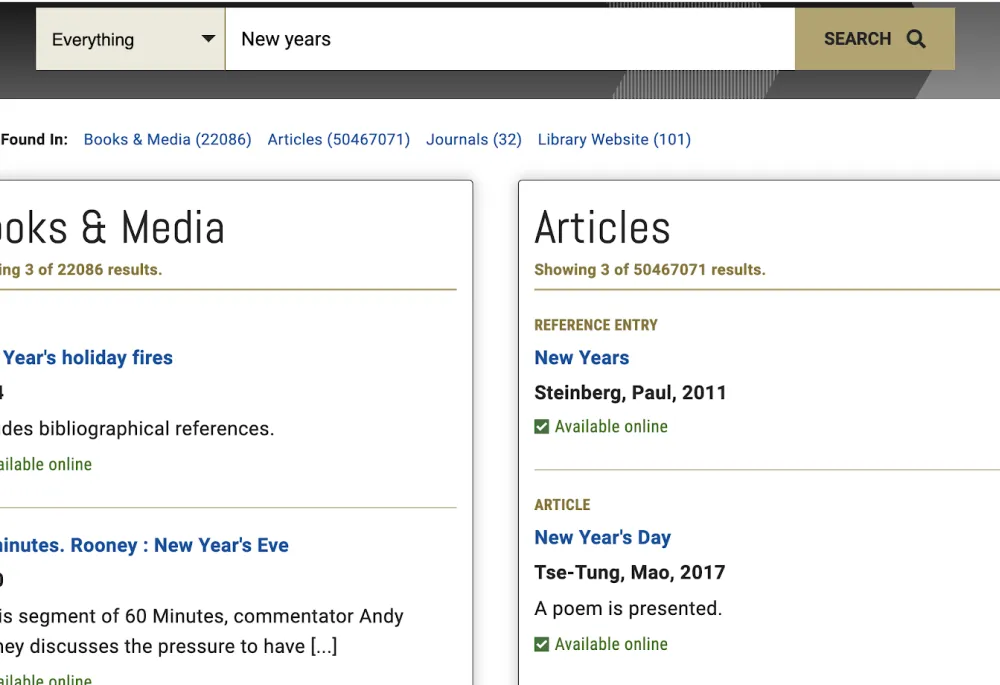
A “bento” design pattern categorizes search results to allow users to take in the breadth of what’s available before diving into a specific category or result. It features topics sorted into card patterns with detail that allow for quick browsing.
Group by Category
Previously overwhelming and disparate search results are folded into categories with handy icons to aid scannability and findability.
Mobile-First
With a simplified, prominent search function and key information (hours, location, and contact information) just a few clicks away, mobile engagement has increased.
Personalized Dashboards
Customizable user dashboards function as a research organization tool with the ability to opt-in to personalized, recommended content, featuring:
- Quick access to users’ own recently cited, bookmarked, and searched content
- User-relevant (based on major) Databases and Research Guides
- Opt-in content feed based on their major or on their behavior (citing, bookmarking, searching).
Design to Scale
With over twenty different libraries in its system, the university serves researchers of multiple disciplines and many user journey paths. To incorporate two previously separate medical and dental library websites into the all-libraries redesign we devised unique personas for these users.
Extended site components allow quick access to popular medical and dental user paths from the home page. We designed a library landing page template to feature mix and match components that work for all 20 libraries, from the smaller sub-libraries to the larger facilities.
Development: Building a Library Research Hub
As an extension of the University Library team, Mediacurrent provided governance and guidance on development best practices to create the new site with Drupal 8 paragraphs and a component-based approach. Combining the library’s third-party tools for resource discovery with bento-style search provides a powerful research engine for the university’s learning community.
Powered by Paragraphs
Paragraphs-based powered by a fully responsive and accessible component library.
Aimed at Site Authors
Reusable, extendible components provide a consistent editorial experience.
Primed for Accessibility
Building on Drupal 8 core as an accessible starting point reduces barriers to access for the library community.
Drupal 7 and WordPress to Drupal 8 Migration
The existing Drupal 7 system for the University Library used over 200 contributed modules. Our approach was to focus on core Drupal 8 functionality over a 1 to 1 update of the current Drupal 7 contributed modules. For the content layout, we switched from a Views-and-Blocks approach to a more flexible Paragraphs-based approach.
Some subsites were built in WordPress and needed to be migrated over to one ecosystem. We used Drupal’s WordPress migrate module for migrating over content from these sites.
Paragraphs and Content Layout
Leveraging work from the Drupal Rain distribution, we built the content layout using paragraph components. Paragraphs work as Lego blocks for creating content, providing the University Library team with the editorial flexibility they need to lay out unique pages.
What worked really well when architecting this site was a components-based approach. This allowed frontend developers to create components in a style guide while a backend developer created fields and form configurations needed for that specific paragraph type. Developers could work in parallel and build out unique components.
Bento Search
Bento-style search provides a solution for the University Library to consolidate its various search resources into one page in a way that is easy to digest. Results are displayed through a React frontend while a Drupal backend serves to normalize data. With just one search query, the bento search system can scan multiple sources (i.e. 3rd party API’s, library databases, and Solr Search) and get a subset of results in what is called “bento boxes.” Each bento box could have results structured differently. We were able to define the output and the number of results returned per box.
Training
Serving as an extension of the University Library’s development team, we worked together to build the new site. Online training sessions equipped the team with the component-based theming and development skills needed to build and style accessible components in a living style guide. The second phase of the training focused on integrating the front-end components with Drupal 8 using the presenter templates approach.
As Mediacurrent developers worked through assigned tasks, they would frequently share their screens for the University Library team to observe. These live pair-programming sessions provided an opportunity to ask and answer questions in real-time, to refine workflows for development, QA, and deployment.
Final Thoughts
With Drupal and Acquia, the redesigned system is proceeding on its long-term road map of growth into a customizable and personalizable research tool. Through a continued partnership with Mediacurrent, the University Library System is uncovering new opportunities for search personalization such as enhancing customization capabilities for bento search results.
Why Drupal was chosen
- Open source: The Library team gains the opportunity to share work within the higher education space.
- Flexible integrations: Connecting with third-party library tools creates a robust research tool for students.
- Accessibility: With features like additional semantics (HTML5 and WAI-ARIA) built into its core, Drupal is a highly accessible CMS.
Technical Specifications
Drupal version:
Key modules/theme/distribution used:
- Rain Distribution - Provided content types and paragraphs out of the box. This allowed for extending and reusing the core functionality to work for the Libraries’ needs.
- Homebox Module - Allowed for personalized dashboards for users who are logged in. This would show users overdue books, bookmarks for content and search results, and many other customized dashboards.
- Flag - Allows users to flag content or specific entity types. This helped with the implementation of the customized dashboards for users. A user could bookmark content they needed for research and create lists that they could possibly share with colleagues.
- Geofield Module - Helped with building out various library location maps. We could pinpoint an exact location using longitude and latitude.